TL;DR
Everyone’s selling “AI ads in 10 minutes”.
This is the opposite.
- I take a brief to a finished first draft in about 5 hours.
- I only step in at four points: the story, the cast, the storyboard and the rough cut.
- Claude Code runs everything in between: references, character sheets, prompts, checks and renders on Seedance 2.5.
Below is the whole workflow, broken down on a real ad (a 2:50 song ad starring a mummy), with screenshots of my tools.
In this post
- Why “just give me the prompt” doesn’t work
- The ad we’re breaking down
- Step 0: Two questions before anything
- Step 1: Story first, and show it literally
- Step 2: References, the Pinterest picker
- Step 3: Cast and world
- Step 4: Parts and the production board
- Step 5: Render the pilot, then everything at once
- Step 6: The rough cut
- Prompt tips that work on any ad
- FAQ
Why “just give me the prompt” doesn’t work
So before the workflow, one bit of maths, because it’s the reason this whole thing looks the way it does.
Say the AI gets each step right 90% of the time.
Sounds good, right?
Now chain five steps: write the script, pick references, make the character, write the prompt, render.
0.9 × 0.9 × 0.9 × 0.9 × 0.9 = 59%.
That’s the AI failing about 4 times out of 10, and every failure on the video side costs you credits.
That’s basically why a prompt pack never gets you the ad in the thumbnail.
A prompt is the last step of a chain.
If the character sheet drifted, or the reference was wrong, or the story didn’t make sense in the first place, the best prompt in the world renders a very nice-looking wrong video.
So I don’t let Claude improvise.
My setup has three layers:
- Directives: written instructions for every stage, like you’d give a new hire. What to do, which tool, what good looks like, what went wrong last time.
- Claude Code: reads the directive, makes the decisions, calls the tools in order, and asks me when it’s actually my call.
- Scripts: plain Python that does the repeatable stuff the same way every time: scraping references, checking prompts, rendering, cutting the edit.
The AI only does the part AI is good at, the judgement.
Everything that can be deterministic is.
And every time something breaks, the fix goes back into the directive, so it doesn’t break twice.
The ad we’re breaking down
It’s a song ad for a men’s health supplement: 2 minutes 50, Pixar-style 3D, set in a desert village in ancient Egypt.
The hero is a tired mummy who’s letting his wife down.
It’s a comedy.
The song was already written and approved, so the job was the visuals.
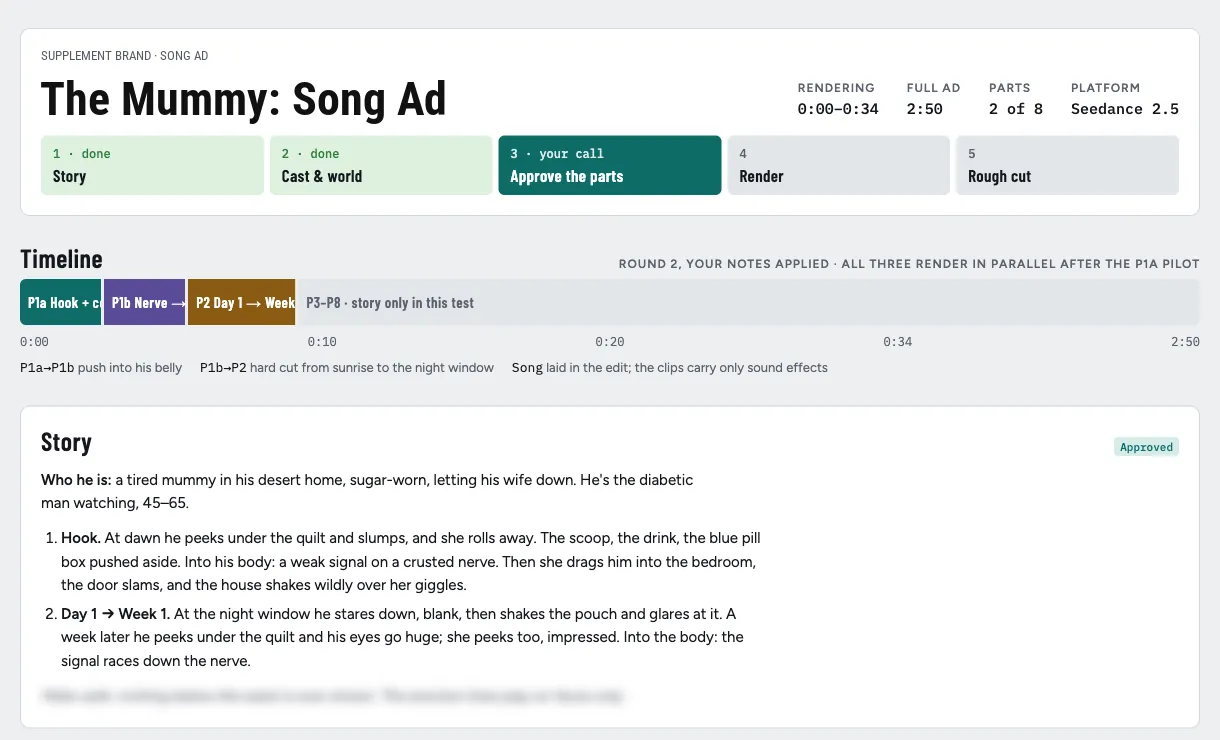
This was also the first ad I ran start to finish through the rebuilt pipeline, so every mistake in it became a rule.
It ended up as 8 parts plus 5 short inserts, plus two alternative hooks for testing.
I’m not linking the video (client work), but you’ll see most of it in the screenshots.
Step 0: Two questions before anything
Before anything gets generated, Claude asks me two things:
- Which brand? Every brand I work with has its own account on its own email. Rendering on the wrong login bills the wrong company, so Claude checks the account before every paid run. Boring, but it’s the kind of mistake that costs you a client.
- Who is the ad for, and what does the main character look like? The main character should look like the viewer. Here it’s men 45–65 with type-2 diabetes, so the mummy is a lanky, pot-bellied, tired older guy, not a buff action hero.
Then it checks the library first.
I keep every approved character, room and reference from past ads, so the mummy, his wife and the doctor were reused, not rebuilt.
That’s hours saved before we’ve even started.
Step 1: Story first, and show it literally
This is the one most people skip, and it’s the one that matters most.
The first version of this ad (before the new pipeline) was built the other way round.
I took a viral ad as reference and restaged it shot for shot, 73 shots, with stand-ins for everything: a wrapped banana as the… you get what I mean.
Symbolic props, metaphors, clever swaps.
It looked fine.
But when you watched it, you had to decode it.
So the rule now is: every line shows what it says, in a moment the viewer actually lives.
For every line of the song I ask, what does the viewer see that makes this line true?
If the answer is a symbol, it gets rewritten as the real thing.
So instead of a banana:
- He wakes up at dawn, lifts the quilt, peeks under it, and his shoulders sink. His wife rolls over and turns her back on him.
- A week later, same peek. His eyes go huge. She peeks too, eyebrows up.
Nobody has to decode that.
And notice it’s all on faces: nothing below the waist is ever shown, which keeps it inside ad policy without watering down the joke.
A few other story rules that came out of this:
- Show the mechanism, don’t symbolise it. The camera pushes into his body, you see the actual nerve crusted with sugar and a weak signal flickering along it, and then it pulls back out to him.
- The payoff is someone’s reaction. A sigh, a smirk, a grin. The wife is the payoff, not the product.
- The product ritual is on screen: scoop, pour, stir, drink.
- The first 3–5 seconds change picture every ~1–1.5s, and the audio starts hot. No intro.
The story gets written in plain language (“we see him at dawn on the edge of the bed…”) and I approve or rewrite it.
That’s gate 1. No images, no credits spent.
This one got approved in the first round.
Step 2: References, the Pinterest picker
This is where I used to lose hours.
Searching Pinterest myself, downloading, dragging stuff into folders.
Now Claude writes the searches, a script scrapes them, and I get this:
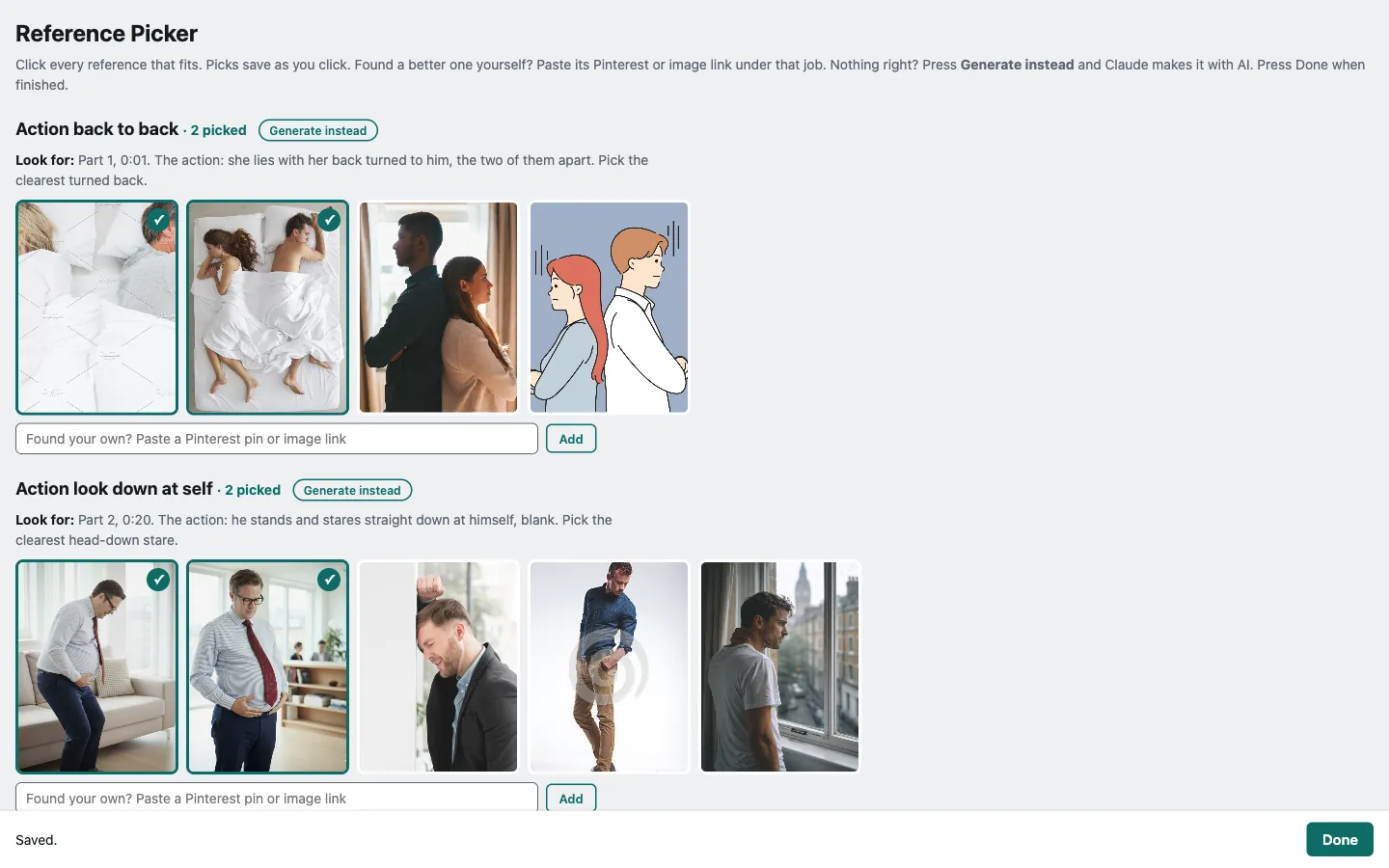
Every “job” (one action, one location, one look) has a “Look for” line telling me which part of the ad it’s for and what matters.
I click what fits, and every click saves.
Found something better myself?
Paste the link in.
Nothing works?
Generate instead, and Claude makes the reference with AI.
Then I press Done and it carries on.
A few things I learned the hard way:
Search the way people post, not the way prompts read.
Claude’s first searches were long and descriptive, like image prompts.
Mine were short: “tired woman in her 40s messy hair”.
Pinterest is people posting their lives, so you search what they’d caption it.
Search the action only.
A reference is there to show a push, a pull, a look down.
Not the scene, not the lighting, not the product.
So instead of “man staring down at his body at night by a window”, you search “man looking down at his belly”.
The render puts the rest back.
If the object is hard to find, swap it for an everyday one (a plate instead of a pill box); the render swaps it back too.
When search fails, generate the reference.
Nobody on Pinterest has photographed a hand pushing a pill box away from the right angle.
So Claude generates one with an image model.
One action, clean, no text.

Filter before showing.
An unfiltered round was about 80% misfits.
Now Claude looks at every image against the “look for” line first and only shows me the 4–8 best per job.
It learns my taste.
Every pick and every pass gets logged, and the lessons go into a taste file Claude reads before the next search.
My pick rate on this ad went from 43% to 62% in two rounds.
Why bother with references at all?
Because text is terrible at describing actions.
The bridal carry in an earlier ad failed three times from a written description and worked first time from a photo.
Hard actions get a picture, not a paragraph.
Step 3: Cast and world
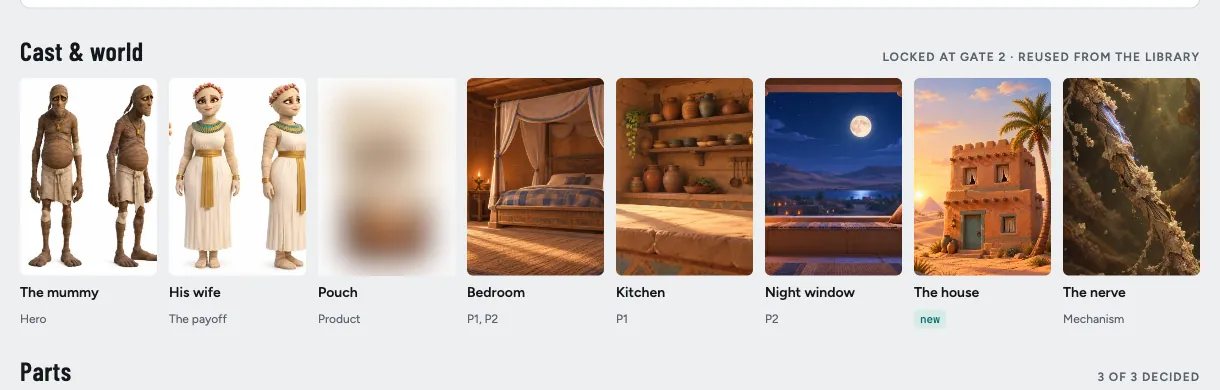
Characters get a four-panel character sheet: a straight-on, passport-style headshot, plus front, three-quarter and back full body.
The headshot is the identity anchor.
When a clip turns him away from camera, the back panel covers it.
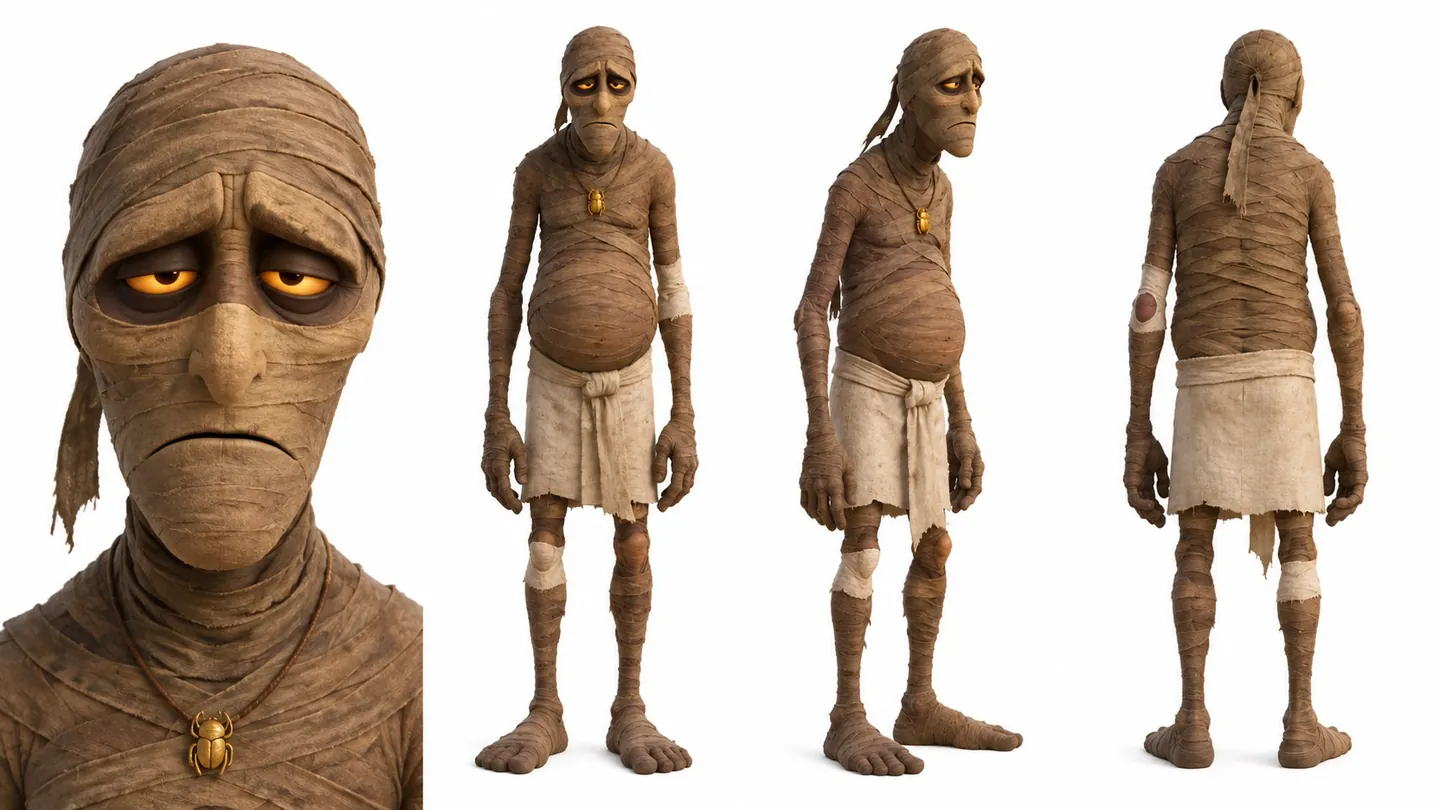
The detail that actually fixed consistency: say what a non-human is made of.
Left alone, the model picks the scariest version of a mummy.
So every prompt says: “a living man under old linen wrappings, never a skeleton, never a zombie, never scary.”
Locations are one plate per room.
Any room the camera moves around in gets turned into an actual 3D world, so the furniture stops moving between shots.
That’s a whole post on its own.
The product is one locked image with the label on it, and it’s never described in words.
And every approved asset is locked.
It never gets regenerated, only replaced if I say so.
A regenerated character sheet is a recast character.
That’s gate 2. One contact sheet, I approve, done.
Step 4: Parts and the production board
Seedance 2.5 can do up to 30 seconds with multiple shots in one generation.
So I don’t think in shots anymore; I think in parts: chunks of 10–30s, each one a single generation.
The trick is where you split them.
If the join is a natural cut (a new room, a zoom into the body, a door slam), it doesn’t need to match pixel for pixel, so all those parts can render at the same time.
Only a truly continuous join has to wait for the previous part’s last frame.
And then there’s the board.
This is where I spend most of my directing time:
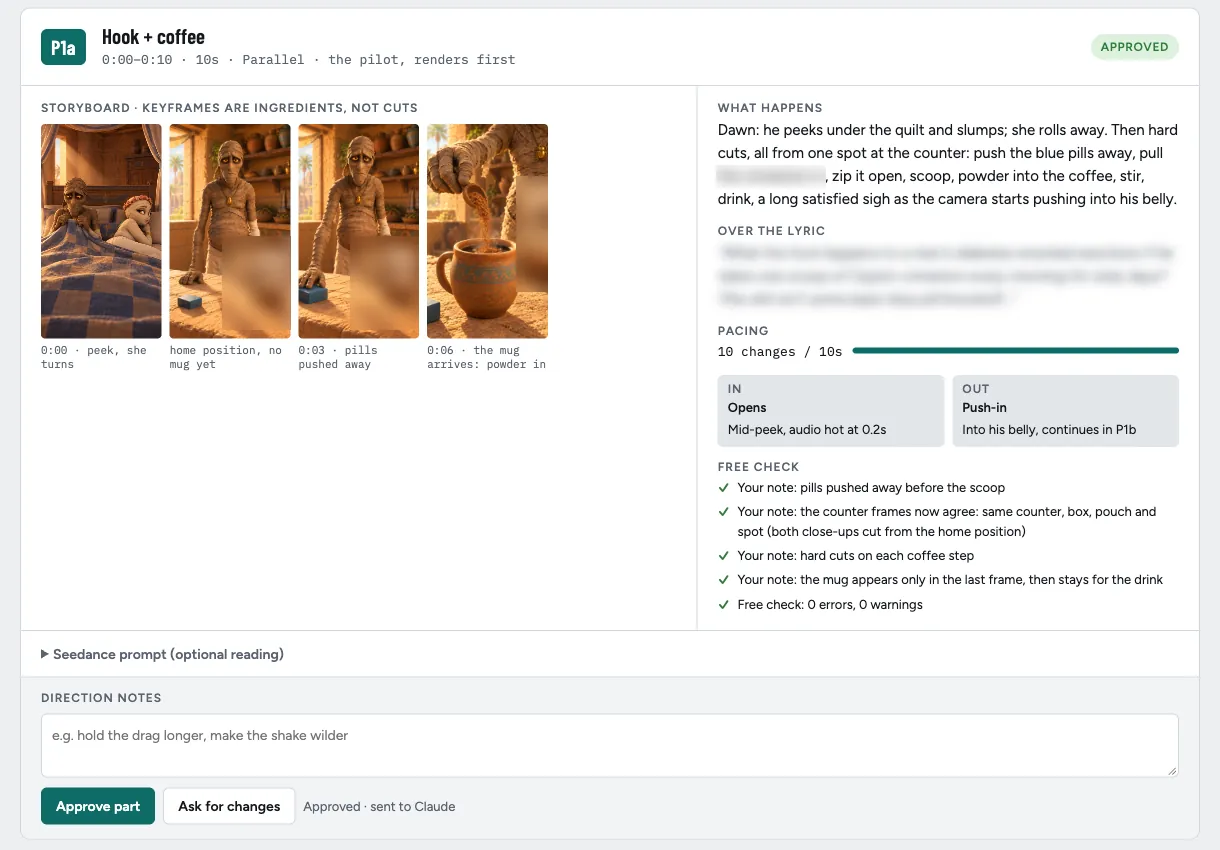
Each part shows:
- The storyboard: the keyframes. Pictures, not prompt text. I review pictures; the prompt is there if I want it, but I never have to read it.
- What happens, in plain words.
- Pacing: how many picture changes in how many seconds.
- In and out: how it joins the parts either side.
- The free check: my notes from the last round, confirmed, plus an automatic check of the prompt.
I type notes, approve or ask for changes, and every click goes straight back to Claude.
I press Done and it gets to work.
No copying and pasting between chats.
The biggest lesson in this whole step: keyframes are ingredients, not shots.
I’d been treating every still as a cut.
Too many keyframes and Seedance just animates a slideshow.
You only make a still for something Seedance can’t invent on its own: a new room, a new outfit, a pose it keeps getting wrong.
Everything between keyframes is written as flow.
On another ad I removed three keyframes at this gate and every part got better.
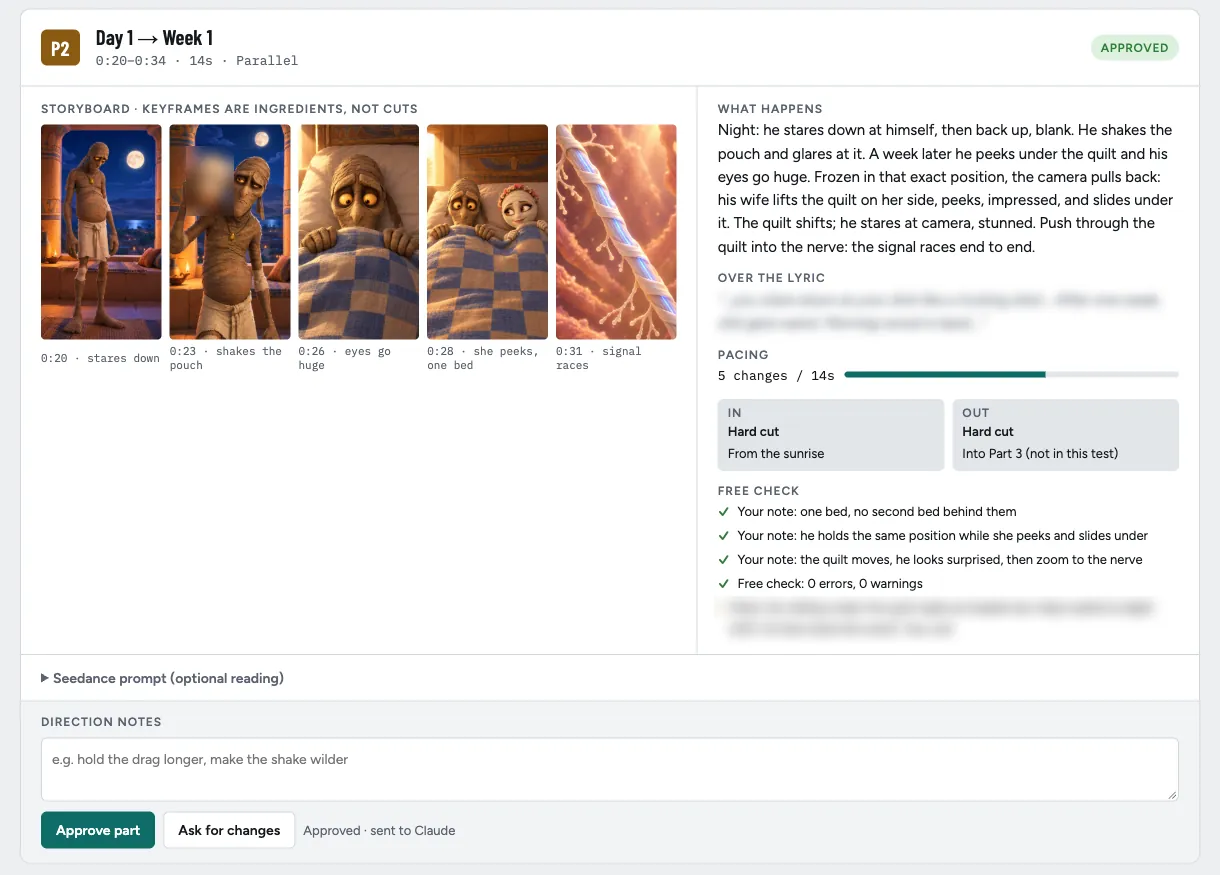
The free check runs on every prompt before a single credit is spent.
It’s a script that catches the stuff that wastes renders: a reference attached but never mentioned, too many camera moves, too many words for the time, style filler like “cinematic, 4k, masterpiece”.
On top of that there’s a checklist, and every item on it is a rough-cut note I got on this ad:
- Where everyone stands, in every shot. Nobody behind the person they’re talking to.
- Into the body through the chest or hips, never through an arm or a prop.
- A POV shot never shows the viewer’s own face.
- Count the props. “ONE scoop, no spoon”, or you get two.
- Nothing important in a render’s last second, because it gets trimmed.
This is basically my whole philosophy: never spend credits to find out something text could’ve told you.
Reading a prompt is free.
Rendering it to find out it was wrong isn’t.
That’s gate 3. This board took 2–3 rounds.
Step 5: Render the pilot, then everything at once
The riskiest part (the one with the hardest actions and the most references) renders first, alone.
That’s the pilot.
I watch it and give timestamped notes: “0:00, the peek runs long.
2.5s, she smirks instead of turning away.”
Each note changes one input at that exact moment, nothing else.
On this ad, the first pilot got the hard cuts right but merged two beats and ran the opening long.
The fix wasn’t more adjectives.
It was better inputs: a new still of him actually lifting the quilt, one of her with her back turned and arms crossed, and one of the scoop coming out of the pouch.
Pilot two: all 10 beats landed in 10 seconds.
Then every other part renders at the same time.
A script dry-runs all of them first and checks there’s enough balance for the whole batch, because running out of credits halfway through a batch (which happened) is the worst way to find out.
Step 6: The rough cut
Claude assembles the cut from an edit list: trims, transitions, one colour grade across every part so they feel like one shoot.
Before rendering it runs a splice check, because Seedance’s cuts land up to 0.2s off where the prompt asked.
Cut too close to one and you flash a frame of the wrong shot.
Both glitches I found in the first cut were that.
Then I watch it.
That’s gate 4. The rough cut took three rounds of notes, and here’s the thing: most notes cost no render at all.
The fix order is:
- The edit. A payoff that got trimmed off, put back. A slow start, cut.
- An insert. A short 4–6s render of new angles on the same moment, cut into the scene.
- A re-render, only for a moment no take has.
Two pacing rules came out of this cut, and they’re now locked:
- A held scene (people acting, one angle) changes angle every ~2 seconds.
- A flowing shot (a ride down the bloodstream, a dive) never cuts. I felt every cut inside the vein ride. It stays one continuous move.
Captions come out as an SRT file, never burned in, so the editor has control.
Hook variants: once the main cut exists, a new hook is one new render.
A script lines the new song up against the old one and finds the join.
Two extra hooks to test, for the price of two short renders.
Prompt tips that work on any ad
A few things I put in every Seedance prompt now.
They’re small, and each one fixed a real problem:
- Start shot 1 “already mid-motion”. Nobody starts an action on frame 1, so there’s no dead beat at the start.
- Say how many people are in the scene: “two figures only… no reflections of other people.” Leave it out and extras show up.
- Give the character one home position: “he never moves from this spot.” Then the counter, the props and the product agree across every cut.
- Write “do not use it in other shots” on every reference image. Otherwise it leaks into shots it doesn’t belong in.
- Name the surface for sound: “cardboard scraping across stone”, not “pushes the box”. The model picks the sound from the surface.
- Keep appearance out of the action text. The references show what someone looks like; the text only says what happens.
- Put the look line first and the timing right under it. The model holds hardest to the top of the prompt, so that’s where the things that must not drift go.
FAQ
What is Seedance 2.5 good at for ads?
Multi-shot sequences in one generation (up to 30s), holding characters steady across many references, and native sound effects.
It’s weakest at complex physical actions described in text, which is why hard actions get a reference image.
How long does an AI ad take with this workflow?
The target is about 5 hours from brief to first draft, with me directing at four gates.
The first full run of this ad took a long day, because every mistake got turned into a rule as we went.
Do I need to know how to code to use Claude Code for video?
Not to use it.
Claude writes and runs the scripts.
What you need is taste and the patience to write down what went wrong, so it never happens twice.
How do you keep AI characters consistent across shots?
A four-panel character sheet with a straight-on headshot, one reference per job (two photos of the same face get averaged into a stranger), saying what a non-human is made of, and an instance lock in every prompt.
Why not just use one long prompt for the whole ad?
Seedance caps out at 30 seconds, and long prompts dilute.
Splitting at natural cuts means the parts render in parallel, and a fix only re-renders one part.