TL;DR
I used to make AI ads by typing prompts, reading the result, and typing more prompts.
Now I don’t write prompts at all.
I direct.
- The AI (Claude Code) does all the work between decisions: references, character sheets, prompts, checks, renders, the edit.
- I only step in at five pages, one per decision: the story, the references, the cast, the storyboards and the rough cut.
- Every page works the same way: I approve, edit or leave a note, press Done, and the AI picks it up from there. Nothing goes through chat.
- It’s the same system for every ad, whether it’s a 15-second UGC hook or a 9-minute drama. A longer ad is just more rounds, never more than a minute at a time.
Below is how I got here, and every page, with screenshots from a real ad.
So does it actually work?
This is what my lead editor sent me after the first batch of ads I made with it.
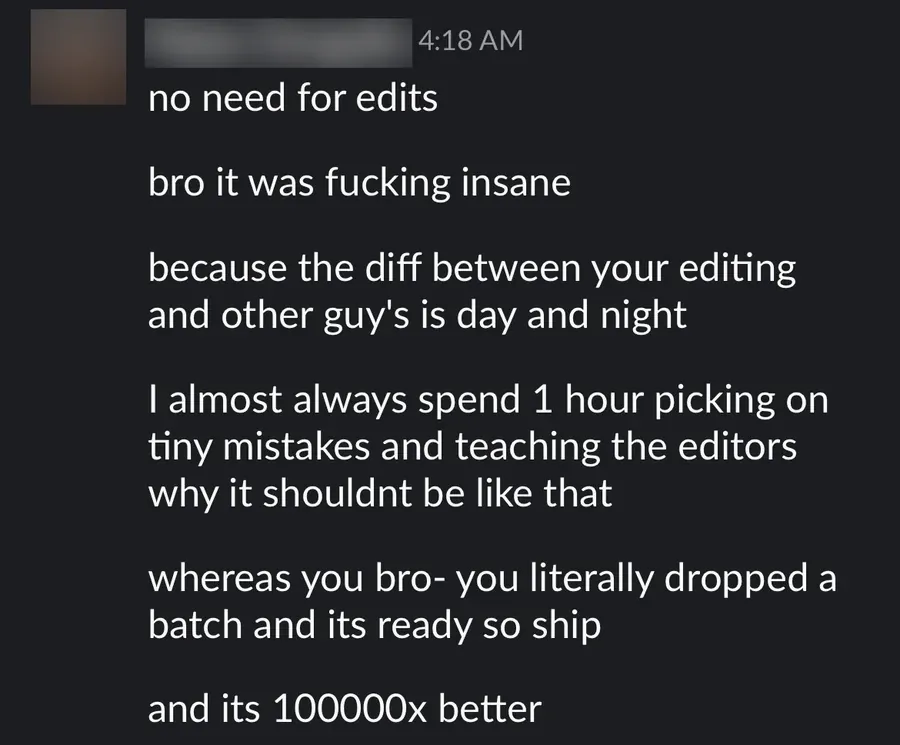
No notes, no second round. Here’s the system behind it.
In this post
- Why prompting AI video doesn’t scale
- What a director actually does
- Page 1: The story
- Page 2: The references
- Page 3: The cast and the world
- Page 4: The storyboards
- Page 5: The rough cut
- The rules that make it work
- FAQ
Why prompting AI video doesn’t scale
So when I started, my process was basically a chat window.
I’d describe a scene, the AI would write a prompt, I’d render it, look at it, and type what was wrong.
Then again.
And again.
It kind of works for one clip.
It falls apart for an ad.
An ad is a chain: the story, the references, the characters, the prompts, the renders, the edit.
Say the AI gets each step right 90% of the time.
Chain five steps and you’re at 0.9 × 0.9 × 0.9 × 0.9 × 0.9 = 59%.
That’s failing about 4 times out of 10, and on the video side every failure costs credits.
(I broke that maths down properly in the full workflow post.)
But the maths wasn’t even the worst part.
The worst part was me.
I was the operator.
I was re-explaining the same character in every message.
I was scrolling up to find the note I gave three renders ago.
And whenever the AI showed me something to review, I had to come back to the chat and type out what I thought of it.
The moment it clicked was a storyboard board the AI built for me as a web page.
I went through it, left notes on every part, and pressed the button.
The notes had only saved in my browser.
The AI couldn’t read a single one.
I had to come back and retype everything into chat, and I remember thinking: relaying my own decisions back to the thing that asked for them just doesn’t make sense.
If you’re typing your decisions into a chat, you’re not directing.
You’re the middleman.
What a director actually does
A director on a real set doesn’t hold the camera, light the scene or cut the film.
They decide, at a few points, and everyone else works in between.
So that’s what I rebuilt the whole system around.
The AI works between the decisions.
I only show up at the decisions.
My setup has three layers (again, more in post 01):
- Directives: written instructions for every stage, like you’d give a new hire.
- Claude Code: reads the directive, makes the calls, runs the tools, and stops when something is actually my call.
- Scripts: plain Python for anything repeatable, so it’s done the same way every time.
My pipeline has four gates (the story, the cast and world, the storyboards and the rough cut), and the references get their own page inside the cast gate.
So on top of those layers sit five pages.
Each one is a local web page on my machine, built by a script, and each one shows me exactly one decision.
Every click I make is saved to a file the moment I make it.
When I press Done, the AI reads the file and carries on.
I never relay anything.
| Page | What I decide | What the AI did before it |
|---|---|---|
| Story | Is this the right story, part by part? | Read the brief, wrote the story, audited it |
| References | Which images match what I see in my head? | Wrote the searches, scraped, filtered the junk |
| Cast | Are these the right people and places? | Built character sheets, location sheets, the product plate |
| Storyboards | Is each part right before we spend a credit? | Keyframes, prompts, a free check on every prompt |
| Rough cut | What’s off, and at which second? | Rendered, assembled, graded |
Here’s each one.
Page 1: The story
Everything starts with the story, and the story is written in plain language: what we see, in order, with the lines of the script quoted where they land.
No shot list, no camera jargon.
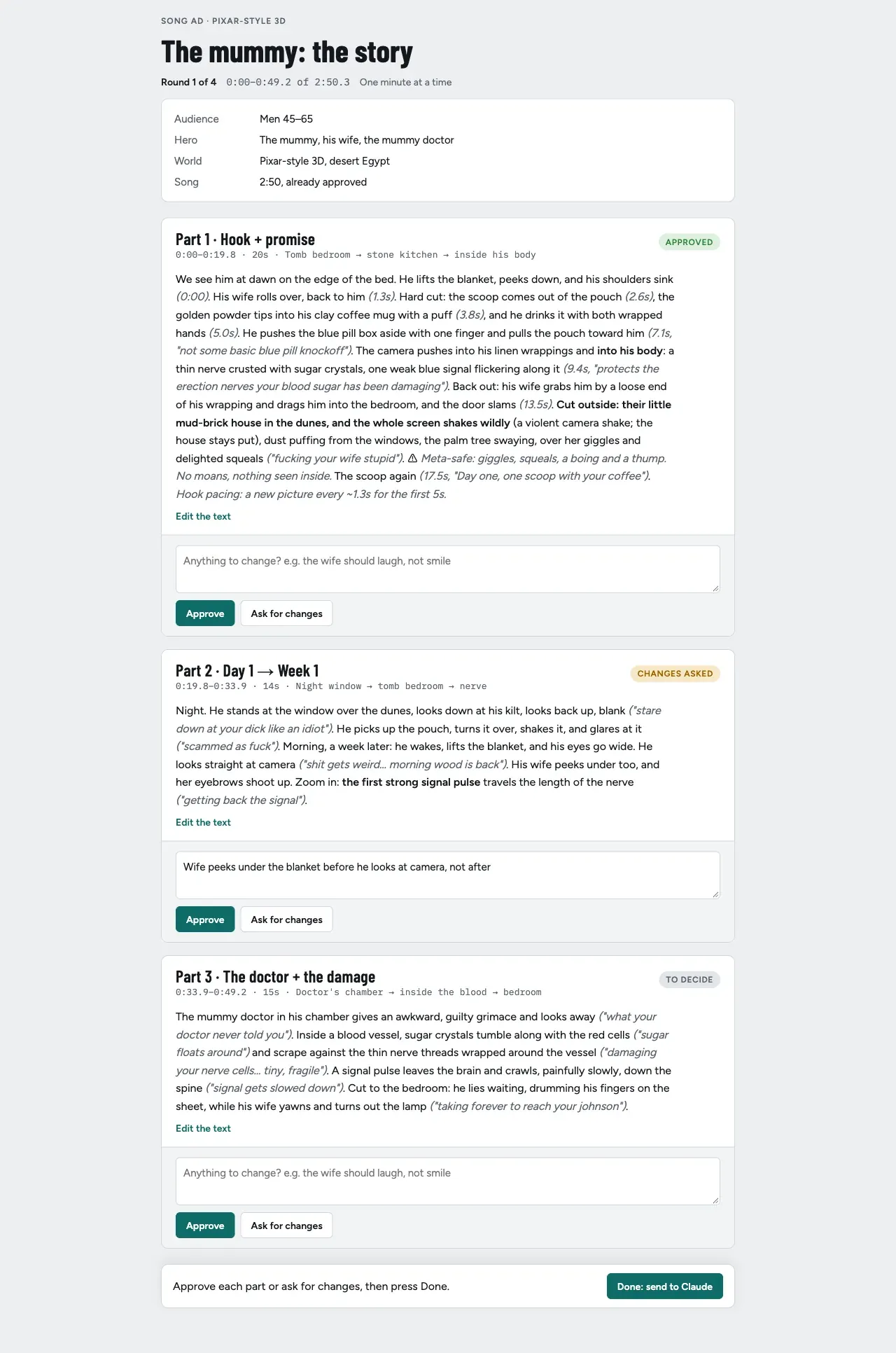
For each part I can approve it, ask for changes with a note, or just click Edit the text and rewrite it myself.
That last one matters.
Some of my best stories are rewrites of the AI’s draft.
On one ad, my version was a man tossing a hay bale like it’s nothing while his wife curls a finger from the doorway.
The AI’s version was a metaphor.
Mine was the one that worked.
Now here’s the honest bit.
The first version of this page was a “scene board”.
It had a timeline, colour-coded acts, a list of every character sheet and location the story needed, and six editable fields per scene: where, who, the hero’s body stage, the lighting, which scene it mirrors…
I opened it and said: this looks more complex than what I’m used to, only show me what I actually care about.
So we rebuilt it.
All that detail still exists, but it’s the AI’s working notes now, not mine.
The page shows the story and three buttons.
Build the page around the decision, not around the data.
Page 2: The references
Once the story’s approved, the AI writes searches for everything I’ll need to see: the look, the lighting, the locations, the hard actions.
Every search comes with a why (“the moment he peeks under the blanket, look for the shoulders dropping”), because nobody can judge a bare “sunset”.
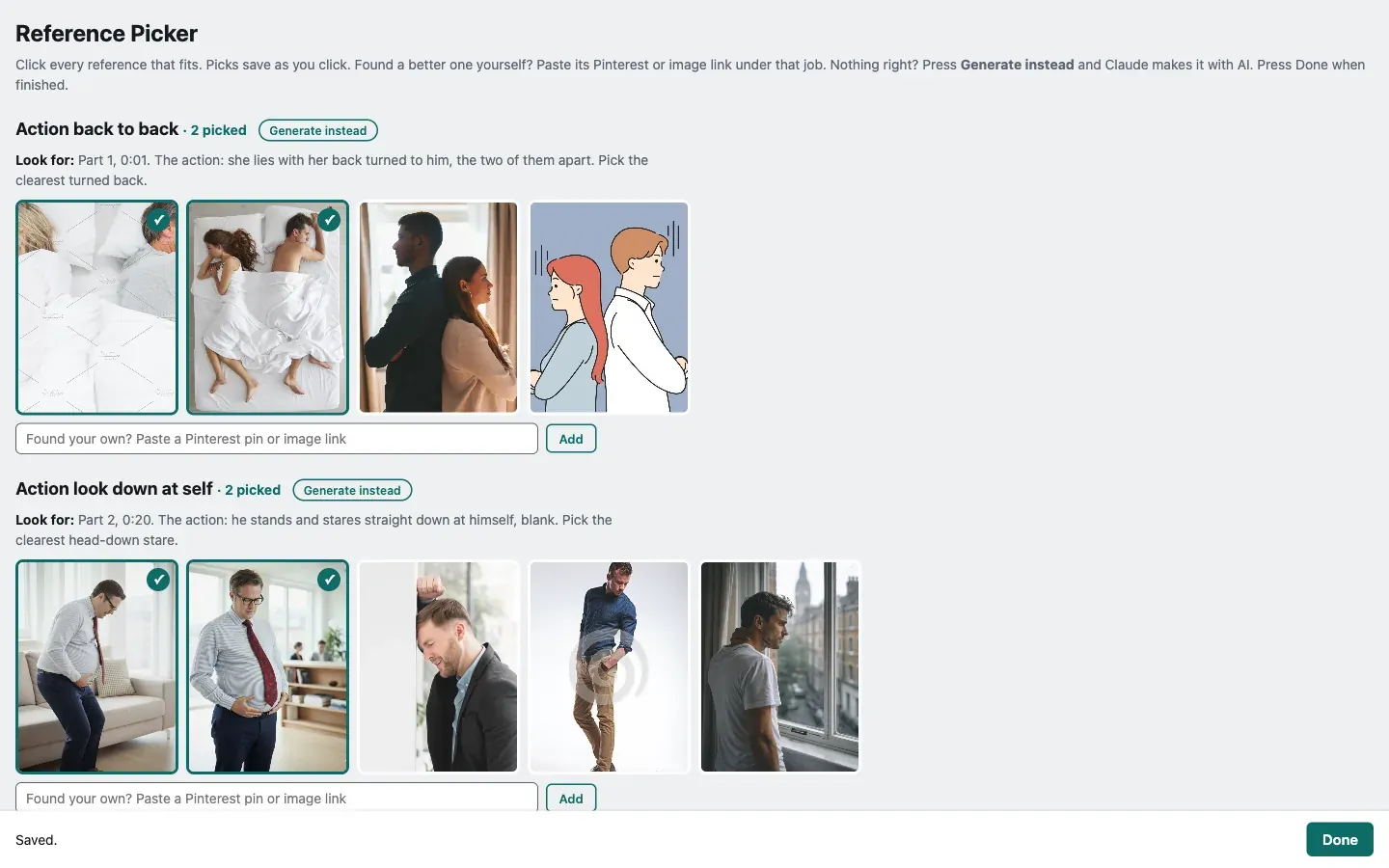
It scrapes Pinterest first and the wider web when Pinterest comes up short, filters out the misfits, and shows me what’s left.
I click what fits.
Every pick and every pass gets logged, so the next round learns my taste.
That filtering step was a lesson too.
An unfiltered round was about 80% misfits, and I was wasting my time scrolling past them.
With the filter and the taste file, my pick rate went from 43% to 62% in two rounds.
Your time is the most expensive thing in the pipeline.
The AI should throw out the junk before you see it.
Page 3: The cast and the world
Next the AI builds the cast: a character sheet for every person (a straight-on passport-style headshot, then front, three-quarter and back), a plate or a location sheet for every place, and the product.
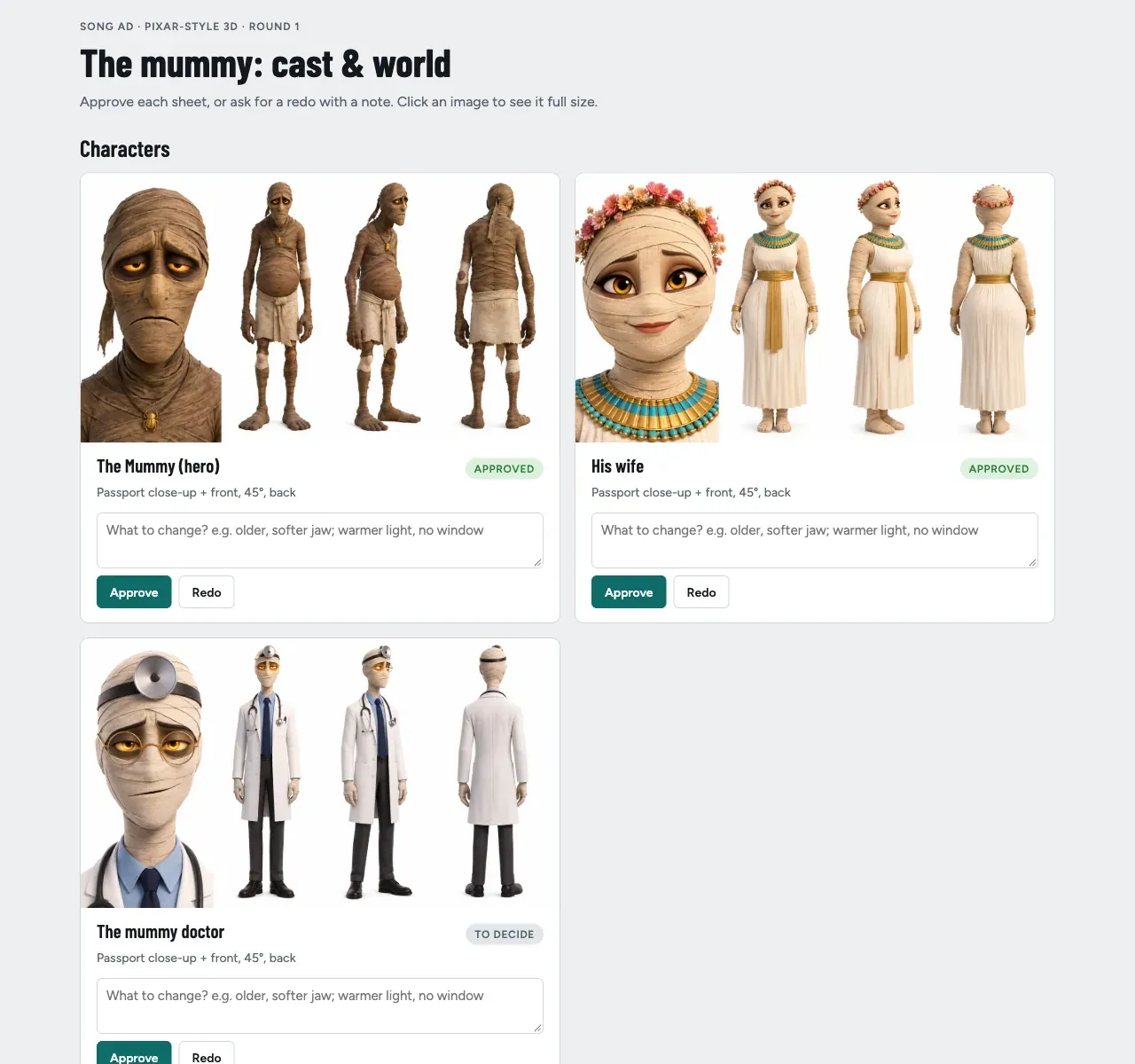
Each one is a card.
Approve, or Redo with a note like “less gold, more dust, it should feel lived in, not a museum”.
A redo gets regenerated with my note and goes back on the page.
Click any image to see it full size.
This page is short on purpose, because it’s the most important one.
Once I approve a character, it’s locked.
It’s never regenerated, only replaced if I say so.
A regenerated character sheet is basically a recast actor, and one recast halfway through an ad and the whole thing stops feeling like one film.
Approve the cast once, then protect it.
Page 4: The storyboards
Now the ad gets split into parts of 15 to 30 seconds, and each part gets a storyboard: its keyframes, what happens, how it joins the parts around it, and the results of a free check on its prompt.
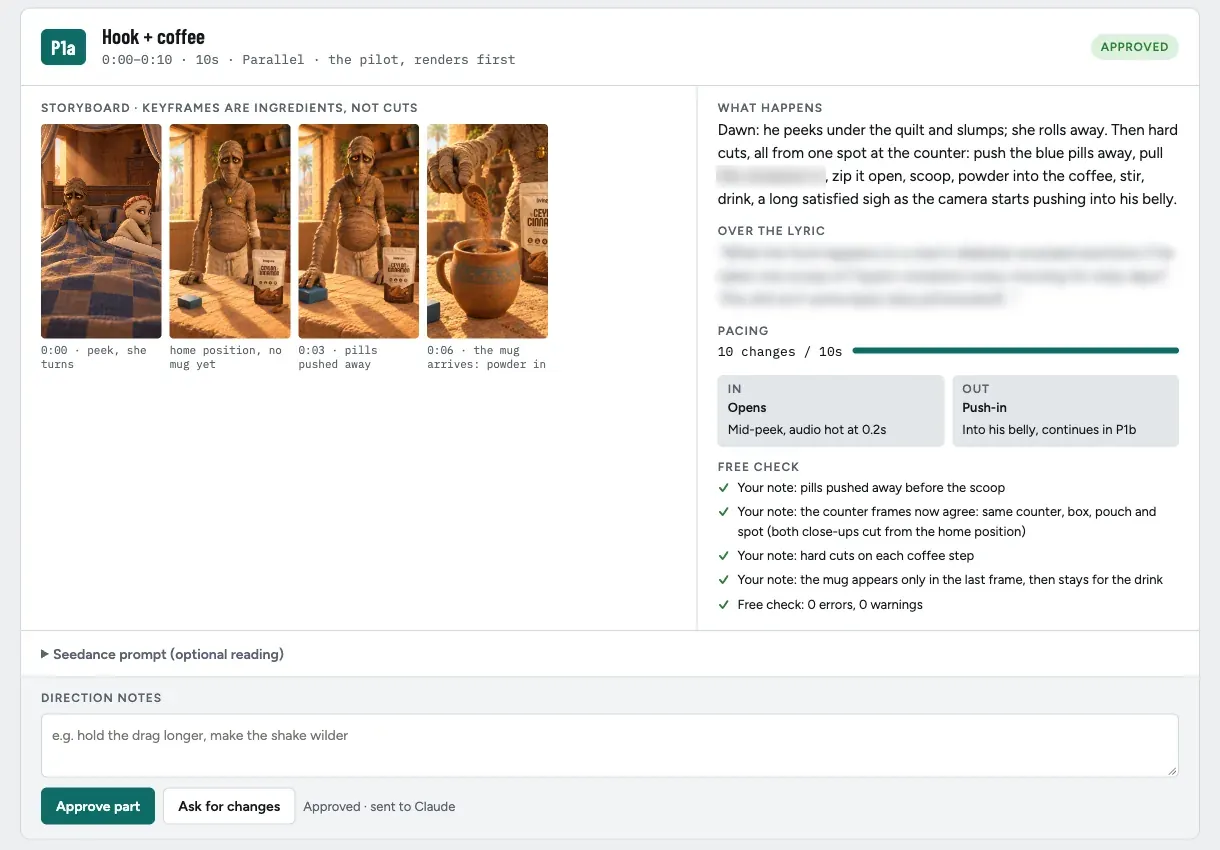
This is where the money gets saved.
Nothing renders until I’ve approved the board.
I review pictures, not prompt text: the prompt is there if I want it, but I never have to read it.
On my first full ad the boards took two or three rounds each, and every round cost nothing but a few minutes.
Never spend credits to find out something a picture could have told you.
Page 5: The rough cut
The last page is the rough cut.
The video plays on the left, and when something’s off, I pause and type.
The note gets stamped with the exact moment.
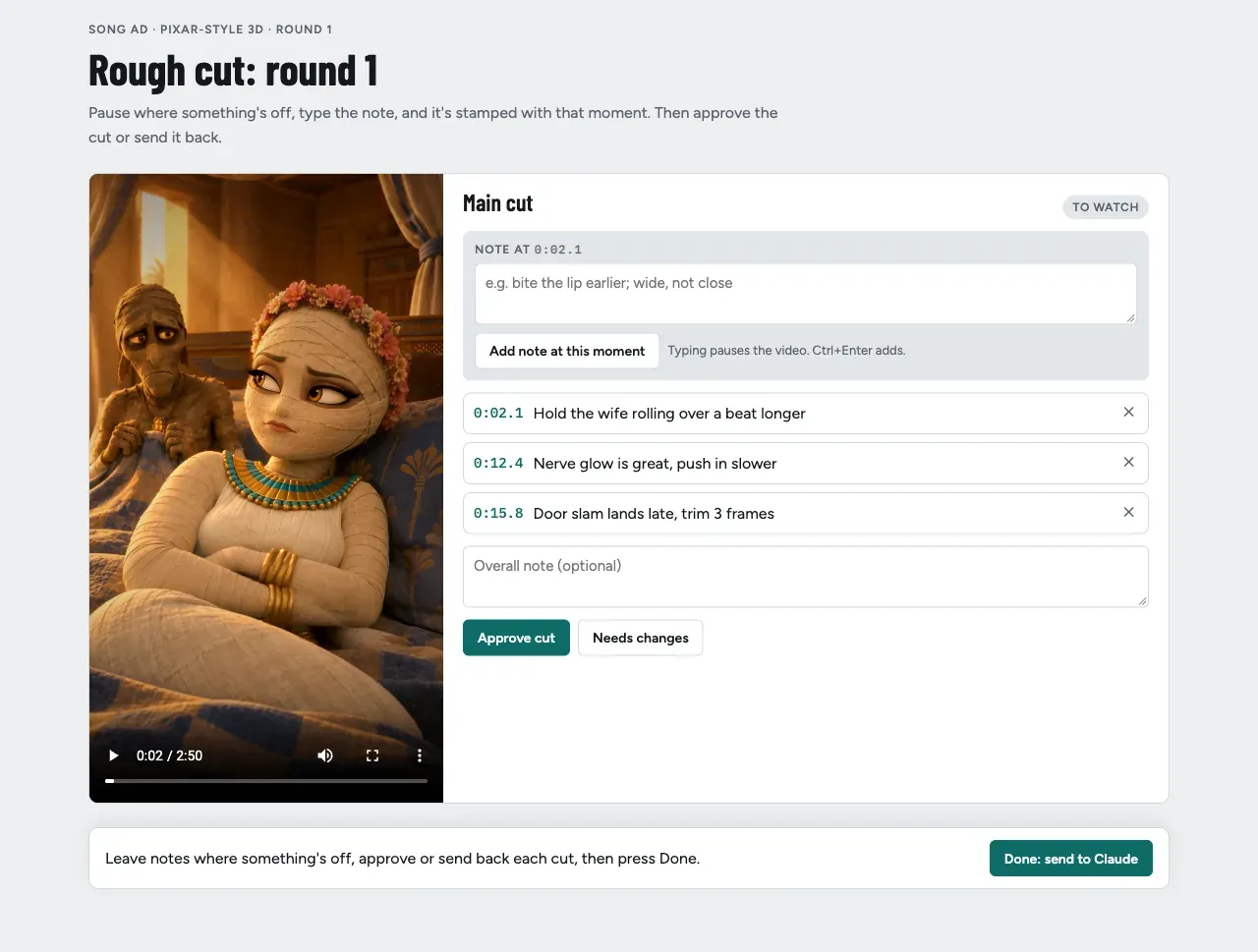
So instead of typing “at about 2 seconds, the wife, you know, when she rolls over…” into a chat, I get this: 0:02.1, hold the wife rolling over a beat longer.
Click a timestamp and the video jumps straight back to it.
Timestamped notes change how the fixes go, too.
Each note changes only the thing at that moment, and the AI fixes it the cheapest way first: in the edit, then with a short insert, and only re-renders as a last resort.
On my first full ad, most of the rough-cut notes cost no render at all.
A note without a timestamp is a guess.
The rules that make it work
The pages are the easy part.
These are the rules that make them work.
1. Never more than a minute at a time.
On an earlier ad we took the first 30 seconds through everything, then did the rest in one go.
Reviewing all the rest in one sitting is too much, even for me, and I built this system.
Now every round is at most a minute: its story, cast, storyboards and cut, then the next minute.
A 3-minute ad is three or four rounds.
A 9-minute ad is ten or more, but no single sitting is ever bigger than a minute.
2. Show only what I decide on.
Everything else is the AI’s business.
If a page makes me read something I’m not deciding on, the page is wrong.
3. The AI reads the file, not my memory.
Every click is saved as it happens, and Done hands the whole set over.
If I close the tab halfway, nothing’s lost, and the page reopens with my earlier decisions loaded back in.
4. Every mistake becomes a rule.
When something breaks, the fix goes into the directive, so it never breaks the same way twice.
Every page here exists because of a mistake: the lost notes, the rewritten story, the 80% junk round, the vague rough-cut note.
5. Learn from the people who do it best.
Recently I went through how one of the top brands running long-form drama ads structures them, from the story beats to how the product comes in.
That’s now baked into how the story gets written and checked, before I ever see it.
The pages don’t change.
The story that shows up on page 1 just gets better.
FAQ
What does “directing AI” mean compared to prompting?
Prompting is writing the instructions for each output yourself.
Directing is deciding what’s right at a few key points (the story, the cast, the storyboards, the cut) and letting the AI write the prompts, run the tools and fix things in between.
What tools do you use for this?
Claude Code runs everything, Seedance 2.5 on Higgsfield does the video, and the five review pages are simple local web pages built by Python scripts.
They run on my own machine, not a hosted app.
Do I need to code to build review pages like these?
No.
I didn’t write them.
I described what I wanted to decide on each page, and Claude Code built them.
The skill is knowing which decisions are yours, and cutting everything else off the page.
Why not just review everything in chat?
Because you end up relaying your own decisions, notes get lost in the scroll, and “around 2 seconds in” is never as clear as a note stamped at 0:02.1. A page also forces the AI to show you only the decision, not its whole working.
How long does an ad take with this system?
About 5 hours from brief to first draft for an ad of up to a minute or so.
A longer ad runs the same system in more rounds, a minute at a time.
Does this only work for big-budget ads?
No.
It’s the same system for a 15-second UGC hook and a 9-minute drama.
A short ad is just one round.